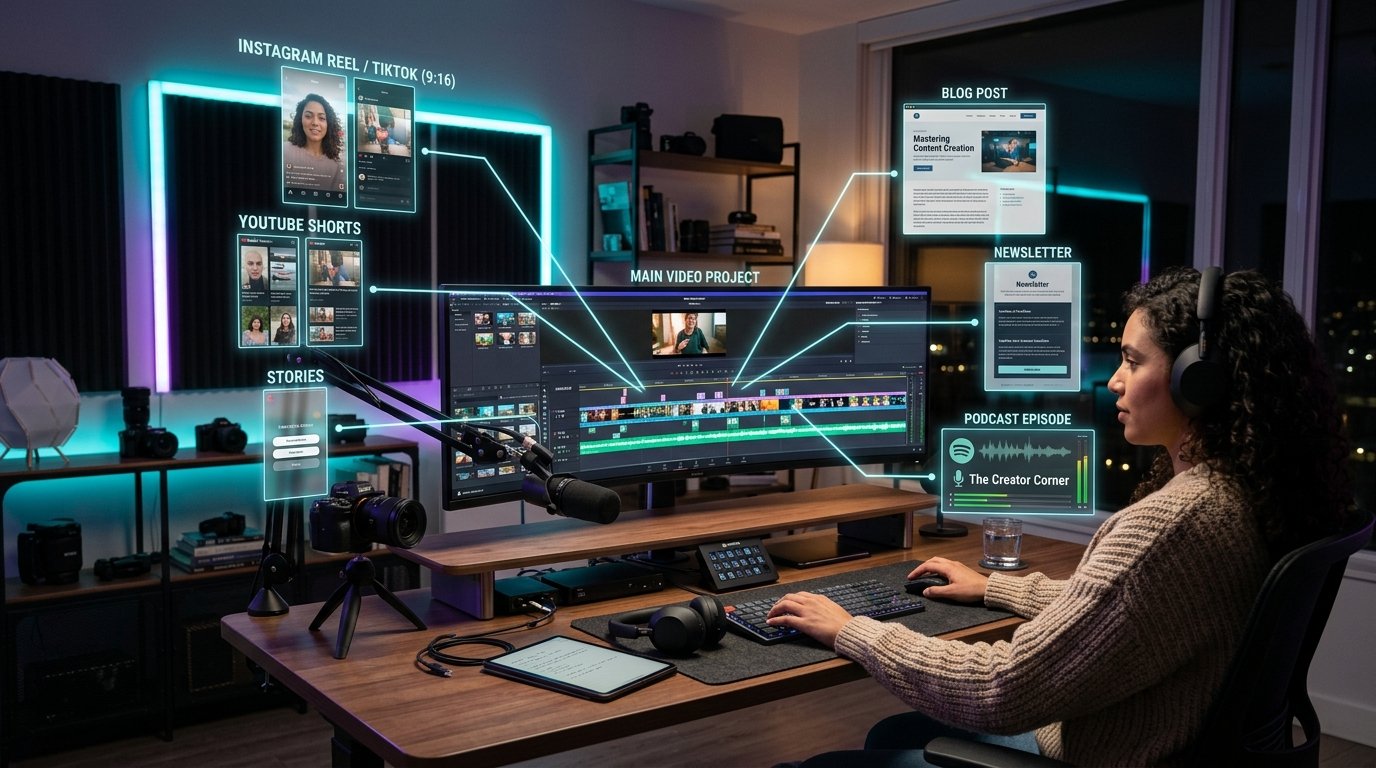
Content Repurposing Masterclass: The Definitive Blueprint to Converting 1 Video into 10+ High-Traffic Media Assets
PART 1: Magnetic Title Options for Maximum Multi-Channel Reach & Organic Engagement
Before building an automated content repurposing workflow, here are 5 high-converting magnetic title formulas designed to capture search intent, maximize social media Click-Through Rates (CTR), and build multi-channel domain authority:
1. **Content Repurposing Masterclass 2026: Convert 1 YouTube Video into 10 Viral Assets** (Primary High-Intent Target)
2. **Why 90% of Creators Waste 20+ Hours a Week (The Automated Content Engine Fix)** (High-CTR Curiosity Hook)
3. **From Video Script to 100,000 Search Visitors: The Ultimate Multi-Platform Blueprint** (Social Proof & Traffic Scale Hook)
4. **The Transcript-to-Blog Pipeline: How to Force Google Search to Index Your Video ROI** (SEO & Feature-Focused Force Multiplier)
5. **How Elite Media Brands Scale Content Production Without Hiring Extra Editors** (Enterprise Authority Hook)
- --

- --
PART 2: Introduction - The Multi-Channel Distribution Paradox & Information Decay
Creating high-production video content is one of the most resource-intensive endeavors in modern digital marketing. A single 20-minute YouTube video, podcast episode, or technical webinar demands dozens of hours of scriptwriting, lighting setup, audio engineering, video editing, thumbnail design, and rendering. Yet, despite this massive investment, most creators suffer from the **Single-Platform Bottleneck**.
When you publish a video exclusively on YouTube or Spotify, its lifespan is governed by algorithmic recommendation windows. A video might experience an initial surge of impressions during its first 72 hours, but unless it achieves rare evergreen search rankings, traffic inevitably plateaus. The rich, expert insights spoken during that 20-minute presentation remain locked inside an opaque audio stream, completely invisible to Google Search crawlers, LinkedIn professionals, Twitter/X thread readers, and email subscribers.
The modern solution is not to produce *more* raw videos—it is to build an automated **Content Repurposing Engine**. By converting spoken video speech into structured text, you unlock a compounding distribution network. A single long-form video can be systematically transformed into a 2,500+ word SEO blog post, a 10-part Twitter/X thread, a high-converting LinkedIn slide carousel, an executive email newsletter, and an active recall PDF study guide.
By leveraging **TranscriptG.com**—the world's premier free client-side AI transcription and content repurposing suite—creators and media teams can eliminate 90% of manual editing friction and scale their brand footprint across every major digital platform simultaneously.
- --
PART 3: The Content Multiplication Economics - Calculating ROI per Production Hour
To understand the strategic advantage of content repurposing, analyze the math behind creator output.
### The Traditional Single-Channel Model (Low ROI)
- **Production Time:** 15 hours (Scripting, filming, editing)
- **Distribution Output:** 1 YouTube Video
- **Total Estimated Audience Reach:** 10,000 YouTube viewers
- **Lifespan:** 3 to 7 days before algorithmic decline
- **Return per Production Hour:** 666 impressions / hour
### The TranscriptG Content Repurposing Engine (10x ROI)
- **Production Time:** 15 hours (Filming original video) + 30 minutes (TranscriptG automated extraction)
- **Distribution Output:** 1 YouTube Video + 1 SEO Blog Article + 2 Twitter/X Threads + 3 LinkedIn Carousels + 1 Email Newsletter + 1 Downloadable Lead Magnet PDF
- **Total Estimated Audience Reach:** 10,000 YouTube viewers + 25,000 Google Search visitors + 40,000 Social Impressions + 15,000 Email Readers
- **Lifespan:** Compound evergreen rankings lasting 3+ years
- **Return per Production Hour:** 5,800+ impressions / hour
- --
PART 4: Step-by-Step Blueprint: Transforming Video Transcripts into 2,500+ Word Blog Articles
A video summary is not a blog post. Summaries are passive and high-level; high-ranking SEO blog posts must be active, structured, and deep enough to satisfy Google's Helpful Content System guidelines.
#### Step 1: Ingest Raw Subtitle Streams via TranscriptG
Paste any public YouTube URL into TranscriptG.com. The browser engine instantly parses the underlying timecoded closed captions, restoring clean sentence punctuation, paragraph breaks, and speaker attribution.
#### Step 2: Establish Semantic Heading Hierarchies
Structure your article around logical H1, H2, and H3 subheadings matching target search queries:
- **H1 Title:** Incorporate primary long-tail keyword (e.g., 'YouTube Video SEO & Content Repurposing Guide')
- **H2 Modules:** Divide talking points into sequential technical steps
- **H3 Sub-headers:** Highlight specific definitions, formulas, and real-world examples
#### Step 3: Enrich with Visual Media & Code Containers
Insert custom screenshots, comparison tables, and code snippets directly into the markdown layout. Embed the original YouTube video at the top of the blog article to boost dwell time signals on Google SERPs.
- --
PART 5: Social Media Thread Engineering (X/Twitter, LinkedIn & Instagram)
Social media platforms reward natively formatted text and visual slides over raw external links. To capture viral social reach:
### The X/Twitter Hook-and-Value Framework
1. **Tweet 1 (The Hook):** State a bold, counter-intuitive metric derived from your video transcript (e.g., 'I converted 1 video into 50,000 blog readers in 7 days. Here is the exact step-by-step workflow:').
2. **Tweets 2-8 (The Value Stack):** Extract 5 core lessons from the transcript, using bullet points and short 1-line sentences for fast scanning.
3. **Tweet 9 (The CTA):** Link to your full blog post and TranscriptG tool workspace.
### LinkedIn Executive Carousel Formatting
Convert your transcript's H2 subheaders into a 7-slide PDF presentation. Use high-contrast dark backgrounds, bold 24pt sans-serif typography, and minimal text density (under 30 words per slide) to maximize dwell time and click-through rates.
- --
PART 6: Code Workflow: Automating Video-to-Markdown Conversion with Node.js & Gemini API
Full-stack engineers and content teams can integrate Google's `@google/genai` SDK to programmatically convert video transcripts into fully formatted Markdown articles:
```typescript
import { GoogleGenAI } from "@google/genai";
const ai = new GoogleGenAI({ apiKey: process.env.GEMINI_API_KEY });
export async function convertTranscriptToBlog(transcriptText: string, videoTitle: string) {
const response = await ai.models.generateContent({
model: "gemini-2.5-flash",
contents: [
{
role: "user",
parts: [
{
text: `You are an expert technical editor. Transform the following raw video transcript for "${videoTitle}" into a comprehensive 2,500+ word Markdown blog post.
Requirements:
1. Include magnetic H1, H2, and H3 headers.
2. Add a comparison table summarizing key takeaways.
3. Include a 5-item execution checklist at the end.
4. Maintain a professional, authoritative tone without fluff.
Transcript Data:
${transcriptText}`
}
]
}
]
});
return response.text;
}
```
- --
PART 7: Content Repurposing Architecture Comparison Matrix
| Strategy Parameter | Traditional Single-Video Upload | Automated TranscriptG Repurposing Pipeline |
|---|---|---|
| :--- | :--- | :--- |
| **Primary Media Formats** | MP4 Video Only | MP4, Article, Social Threads, Newsletters, PDFs |
| **Search Engine Coverage** | Limited to YouTube Search & Video Carousels | Full Google Organic Search, SERP Key Moments, Discover |
| **Production Speed** | 15+ Hours per single piece of content | 15 Hours + 15 Minutes for 10+ pieces of content |
| **Audience Accessibility** | Viewers with audio/video availability only | Readers, commuters, audio listeners, international users |
| **Compounding Traffic Factor** | Drops off after 72 hours | Grows exponentially as blog SEO ranks build backlinks |
| **Lead Generation Conversion** | Low (Description links rarely clicked) | High (Embedded lead magnets, contextual CTAs inside articles) |
- --
PART 8: Frequently Asked Questions (FAQ) - Content Repurposing Decoded
### 1. Will republishing video transcripts create duplicate content penalties on Google?
No. Raw spoken video transcripts converted into structured, well-formatted blog articles with custom subheaders, intro paragraphs, and commentary are indexed by Google as original, high-value written content.
### 2. How long does it take to turn a 30-minute YouTube video into a blog post with TranscriptG?
With TranscriptG.com, extracting the full, timestamped transcript takes less than 15 seconds. Formatting the text into a structured blog article takes under 5 minutes using our integrated AI tools.
### 3. Can I repurpose non-English YouTube videos into English blog articles?
Yes! TranscriptG supports multi-language transcription and instant AI translation, allowing you to ingest videos in Spanish, German, French, or Hindi and publish localized English articles automatically.
### 4. Which social platforms yield the highest ROI for video repurposing?
LinkedIn and Twitter/X deliver the highest conversion rates for text-based repurposing. LinkedIn slide carousels and Twitter text threads generate massive organic impression volume without requiring users to leave the app.
### 5. Should I embed my YouTube video inside my repurposed blog post?
Absolultely. Embedding your original YouTube video at the top of your blog article creates a dual-traffic engine: blog readers increase your video watch time, while video viewers reduce your website bounce rates.
### 6. Is TranscriptG completely free to use for unlimited video repurposing?
Yes, TranscriptG.com is 100% free with no registration, subscription fees, or hidden usage limits.
- --
PART 9: Pre-Publish Content Repurposing Master Checklist
To ensure every video you repurpose achieves maximum organic traffic and brand authority, execute this pre-publish checklist:
- [ ] **Transcript Extracted:** Pulled clean, timestamped closed captions using TranscriptG.com.
- [ ] **H1-H3 Structure Built:** Formatted text into logical modules with targeted long-tail SEO headers.
- [ ] **Video Embedded:** Placed the source YouTube video at the top of the blog draft to boost dwell time.
- [ ] **Social Assets Generated:** Created 1 Twitter/X thread and 1 LinkedIn carousel from key transcript takeaways.
- [ ] **Newsletter Drafted:** Synthesized an executive summary email for subscribers.
- [ ] **Internal Links Added:** Connected new article to relevant tool pages and foundational guides.
By systematically applying this Content Repurposing Masterclass framework, you turn single video assets into a dominant, multi-channel growth engine that compounds traffic and revenue 24/7!
- --
Ready to turn your YouTube videos into viral articles, social threads, and study notes? Launch [TranscriptG's Free AI Repurposing Engine](/) now!
Launch Free Tools